
先在SpringBoot项目中新增一个MyApplicationContext.java文件,内容如下:
import org.springframework.context.ApplicationContextInitializer;
import org.springframework.context.ConfigurableApplicationContext;
import org.springframework.boot.env.YamlPropertySourceLoader;
import org.springframework.core.env.PropertySource;
import org.springframework.core.io.InputStreamResource;

import java.io.IOException;
import java.nio.file.Files;
import java.nio.file.Paths;

public class MyApplicationContextInitializer implements ApplicationContextInitializer<ConfigurableApplicationContext> {

    @Override
    public void initialize(ConfigurableApplicationContext applicationContext) {
        String activeProfile = applicationContext.getEnvironment().getProperty("spring.profiles.active");
        if("uat".equals(activeProfile) || "prod".equals(activeProfile)){
            YamlPropertySourceLoader loader = new YamlPropertySourceLoader();
            try {
                String jbossHome = (String) applicationContext.getEnvironment().getSystemEnvironment().get("JBOSS_HOME");
                PropertySource<?> propertySource = loader.load("externalConfiguration", new InputStreamResource(Files.newInputStream(Paths.get(jbossHome+"\\standalone\\configuration\\application-druid.yml")))).get(0);
                applicationContext.getEnvironment().getPropertySources().addLast(propertySource);
            } catch (IOException e) {
                throw new RuntimeException(e);
            }
        }

    }
}
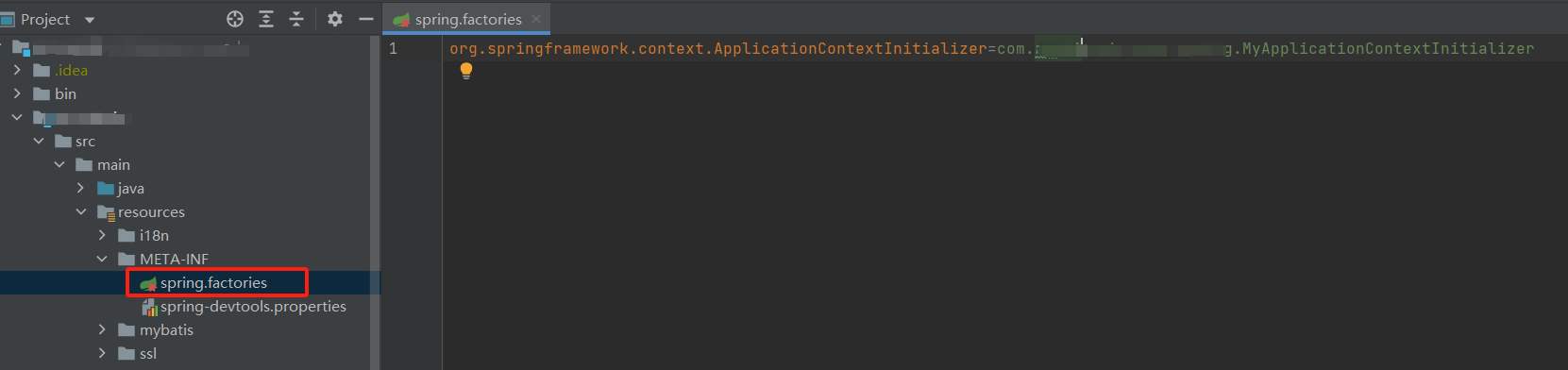
然后再resources的META-INF目录中创建一个spring.factories文件,内容需要指向到刚刚创建的MyApplicationContextInitializer类文件:
在系统中新建JBOSS_HOME环境并指向JBOSS的根目录:

然后在jboss的standalone\configuration目录中放置对应的配置文件:

然后启用jboss服务,此时springboot的war应用会优先到这个configuration目录中寻找对应的application配置文件,找不到时便会使用war包中的配置文件。